
Last updated 12 Oct 2026
Module
Participant management
One record for each participant, used by every team
Participant management keeps everything about a person in one record: their NDIS plan and funded services, goals, contacts, plan manager, support coordinator and support requirements. Rostering, progress notes, billing and the Family portal all read from that record, so your teams don't keep separate copies that drift apart.
What goes in a participant record?
The plan and its funded services, goals, contacts, organisations, the plan manager and support coordinator, and requirements such as language or worker gender. NDIS numbers and dates of birth are stored with field-level encryption.
How do participant requirements affect the roster?
When you assign a worker, the roster checks the participant's requirements, such as worker gender or language, along with the worker's credentials. Your organisation decides whether a mismatch is advisory, needs a reason or blocks the assignment.
What happens when a plan is about to end?
The plan review automation creates a plan review task and assigns the service agreement renewal when a plan ends within 60 days. It is on by default, and you can turn it off.
What do workers see about a participant?
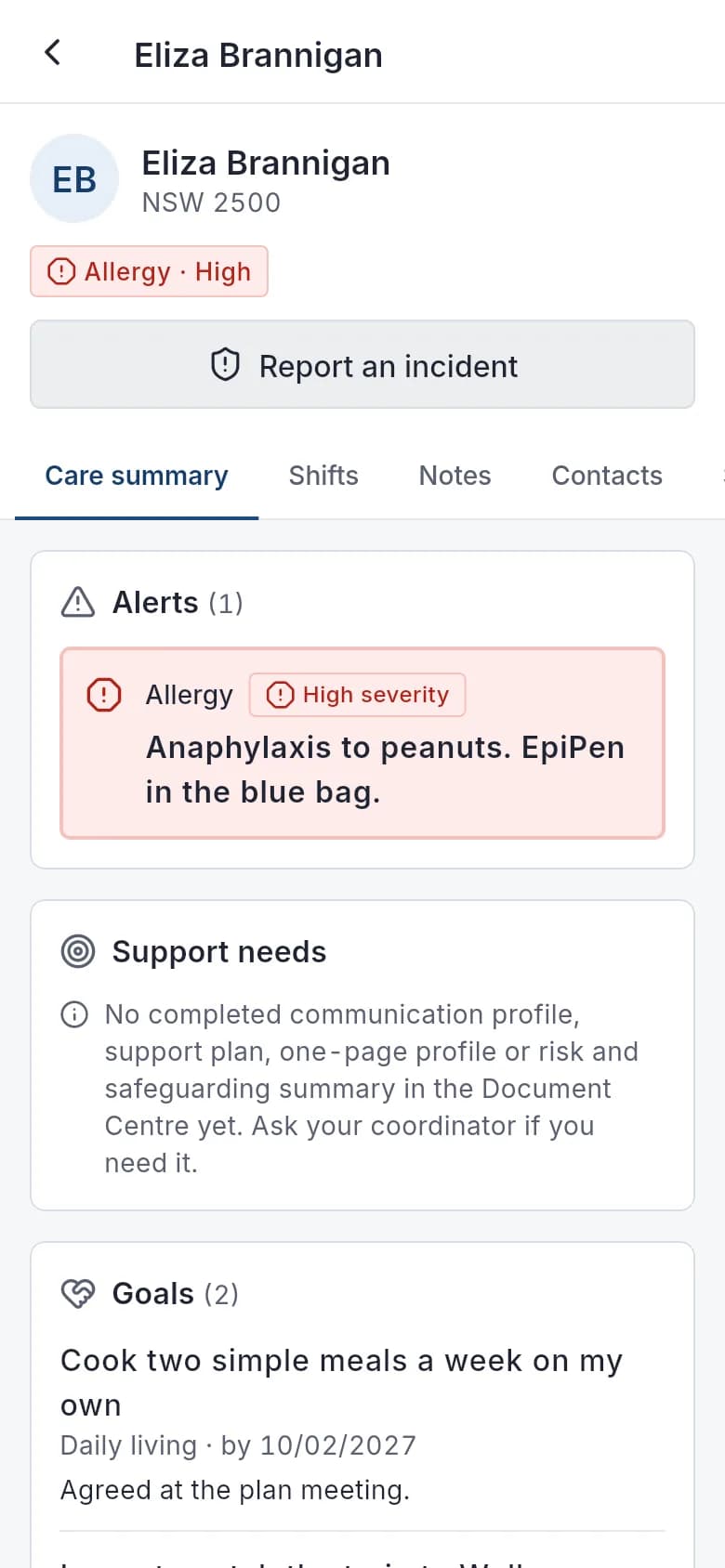
Care information only: support needs, goals, medicines and alerts, in one care summary. Each alert has a type and severity, and shows to workers on shift and as a chip in search. Workers don't see plans, funding or plan managers, and the NDIS number stays hidden in the app until they tap Show.
What happens when a participant leaves?
Making a participant inactive offers to cancel their future shifts (shared shifts just drop them) and end their recurring invoices in one step. You can reactivate them later. You can turn this suggestion off.
What it does and doesn't do
It does
- Keeps plans, goals, contacts and requirements in one record
- Feeds rostering checks, notes, billing and the Family portal
- Shows workers a care summary and alerts, without plans or funding
- Encrypts NDIS numbers and dates of birth at field level
- Creates plan review tasks before a plan ends (on by default)
- Offers to cancel future shifts and end recurring invoices when a participant leaves
It doesn't
- Doesn't download plans from the NDIA; plan details are entered by your team
- Doesn't make funding decisions or tell you what a participant is entitled to
Frequently asked questions
Can we import our existing participants?
Staff can be imported from a spreadsheet (CSV file), with a preview before anything is saved. There's no self-serve participant import: our team helps you move participants, workers and service agreements over from spreadsheets or other software when you set up your account.
Can we record the plan manager and support coordinator?
Yes. Plan managers and support coordinators are kept as contacts on the participant's record, so invoices go to the right plan manager and staff know who to call.
How are goals used?
Goals recorded on the participant are what the note coach looks for when a worker writes a progress note. A note that doesn't mention a current goal gets a prompt before it is saved.
Which participant details are encrypted?
NDIS numbers and dates of birth are encrypted at field level with AES-256-GCM, using a key kept separate from the application key. See security and privacy for the full list.
How it works
Add the participant
Enter their details, or convert an accepted referral so the details carry across.
Record the plan
Add the plan dates, funding management type and the services funded in each category.
Set goals and requirements
Record goals for notes to refer to, and requirements such as a preferred worker gender or language for rostering to check.
Link the people around them
Add family contacts, a plan manager and a support coordinator, and choose what each contact can see in the Family portal.
Who uses it
Intake and enquiries staff
Coordinators
Finance teams
Related modules
Progress notes
A progress note records what support was delivered, what was observed and how it relates to the participant's goals. In Autonomy Care, workers write notes on the shift with short prompts, quick notes and dictation. The note coach checks each note against plain rules and current goals, and Signals flag missing notes before invoicing.
Family portal
The Family portal gives participants and their chosen contacts a secure login. With view access, family members see upcoming and past supports, goals and feedback. With full access, such as a nominee, they also see plans and budgets, the support team, shared documents to sign, messages and support change requests. Providers control each contact's access.
Referrals
Referrals are how new participants reach you. Autonomy Care gives you public referral links to share with support coordinators, families and health professionals. Each referral arrives in an inbox where you mark it contacted, converted or declined. Converting it fills in the new participant record, and declined referrals are deleted after 90 days.
Funding and budgets
Budget tracking compares what a participant's plan holds with what has been invoiced and committed. Autonomy Care tracks each plan service, alerts at 80% and 100% and when the forecast goes negative, and checks the funding impact when you save a shift, booking or invoice. Your policy decides whether overspending warns, needs a reason or is blocked.
See it with your own rosters and plans
Get started, or book a demo and we will walk you through it with your questions.