
Last updated 12 Oct 2026
Module
Signals
Signals find the problems before your invoice run
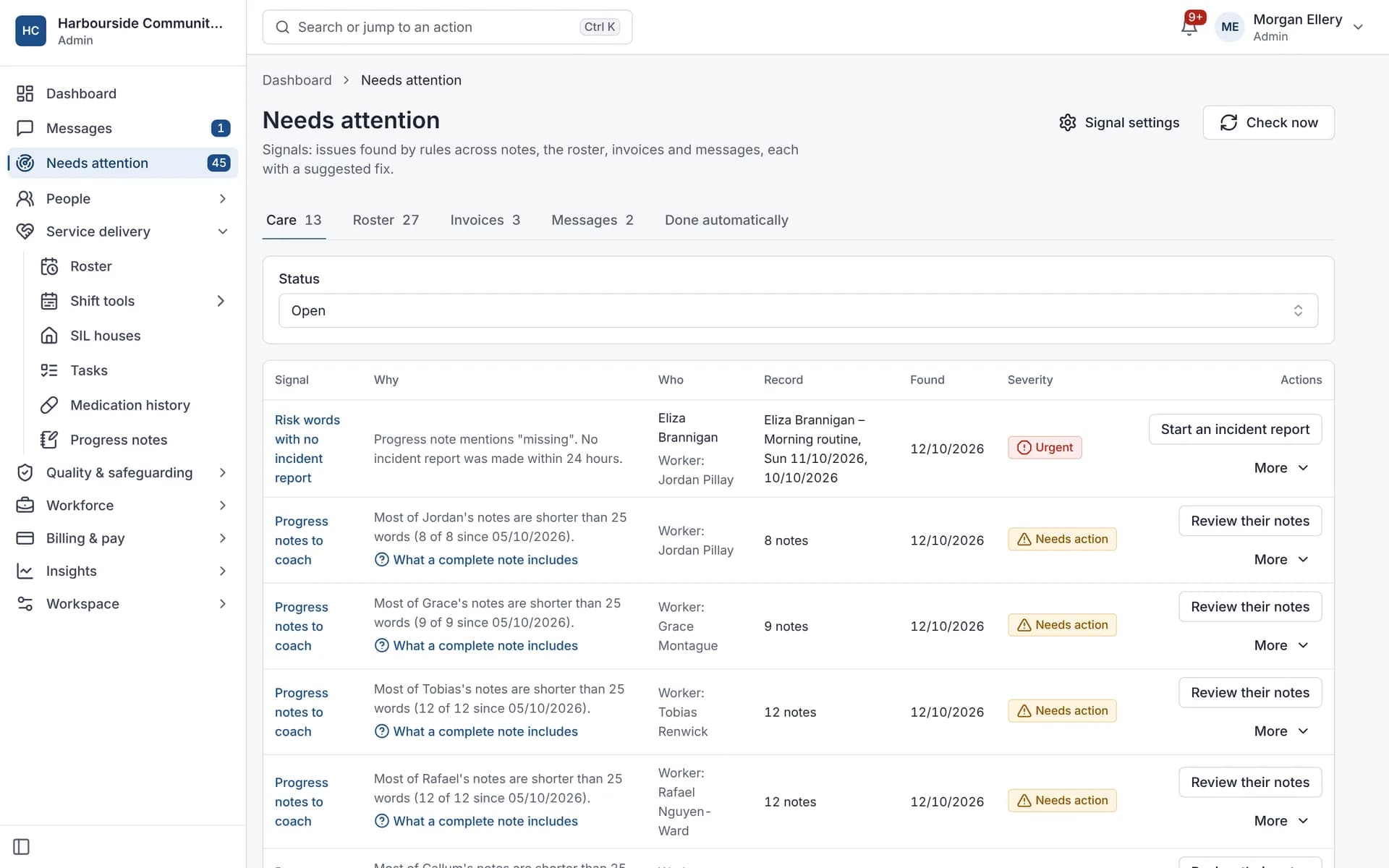
Signals are automatic checks across progress notes, the roster, invoices and messages. Every 15 minutes, Autonomy Care looks for things like missing notes, unfilled shifts, prices over the limit and unanswered messages. Each signal explains why it appeared, suggests a fix, and clears itself once the issue is resolved. The checks follow fixed, written rules, not AI.
Used by Small providers.
What do Signals check?
Care: missing or incomplete notes, notes that mention a fall, injury or other incident but have no incident report, medication refusals. Roster: unfilled shifts, double bookings, expired credentials, hours and short breaks, shifts outside the agreement. Invoices: line mismatches, uninvoiced shifts, prices over the limit, stale rejected claims and unmatched remittances. Inbox: unanswered messages.
Do Signals use AI?
No. Signals follow fixed, written rules (database queries, word lists and thresholds), not AI guesswork, so you can always see why one was raised.
Can Signals fix things automatically?
Each check can be off, detect only, assist (one-click fix) or act. Act is limited to two safe actions: offering an unfilled shift to matched workers, and reminding a worker about a missing note. Money and replies to families are never changed automatically.
What it does and doesn't do
It does
- Runs checks that follow fixed, written rules every 15 minutes
- Explains each signal and suggests a fix
- Resolves signals when the issue clears
- Logs every fix
It doesn't
- Doesn't use AI or machine learning
- Doesn't change invoices or reply to families on its own
Frequently asked questions
Do Signals use AI?
No. They follow fixed, written rules (queries, word lists and thresholds), so you can always see why a signal appeared.
How often do Signals run?
Every 15 minutes, and whenever you press "Check now". Some events, such as writing a missing note, clear a signal straight away.
Can we snooze or dismiss a signal?
Yes. Snooze for up to 90 days, or dismiss with a reason.
Can we turn some checks off?
Yes. Each check type has its own mode: off, detect, assist or act.
How it works
Checks run
Every 15 minutes, or when you press "Check now".
See why
Each signal shows the rule that raised it and the records involved.
Fix it
Use the suggested fix, such as offering an unfilled shift to matched workers or reminding a worker about a missing note.
It clears
The signal resolves itself when the condition clears, such as when the note is written.
Who uses it
Coordinators
Finance teams
Quality managers
Related modules
Progress notes
A progress note records what support was delivered, what was observed and how it relates to the participant's goals. In Autonomy Care, workers write notes on the shift with short prompts, quick notes and dictation. The note coach checks each note against plain rules and current goals, and Signals flag missing notes before invoicing.
Billing and NDIA claims
NDIS billing software turns delivered supports into invoices and NDIA claims. Autonomy Care emails invoices to plan managers and self-managed participants, and builds the bulk payment request file you upload in the myplace provider portal. It checks lines against price limits first, then matches the remittance so rejected lines can be fixed and claimed again.
Rostering and timesheets
NDIS rostering software schedules workers against booked supports while checking availability, credentials and plan funding. In Autonomy Care, each shift carries its support item, so the roster, timesheet and invoice stay in step. Templates, open shifts, swaps and private calendar feeds cut down the last-minute phone calls.
Reports
Reports show how your organisation is going across service delivery, finance, workforce and compliance. Autonomy Care has ready-made reports, such as revenue and margin, utilisation, rostering fulfilment, credential expiry and incidents, plus shift financials and an executive summary. Reports export as CSV or PDF and can be emailed daily, weekly or monthly.
See it with your own rosters and plans
Get started, or book a demo and we will walk you through it with your questions.