
Last updated 12 Oct 2026
Module
Staff, credentials and leave
Staff records, credentials and leave in one place
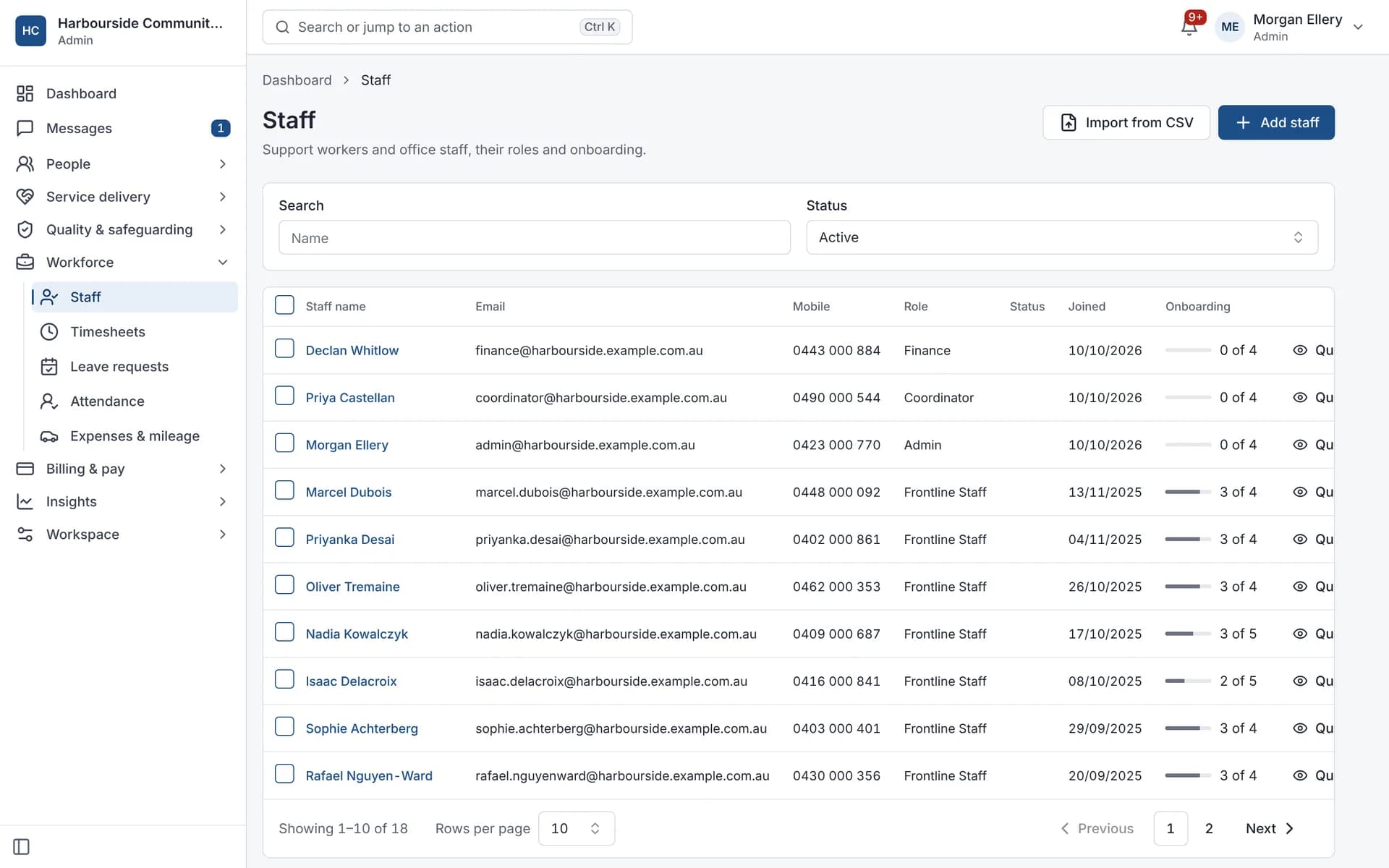
Staff records hold each worker's profile, pay rate, credentials and leave. Autonomy Care tracks credential expiry and alerts workers 30 days before and on expiry. An expired NDIS Worker Screening clearance blocks rostering, and a missing or unverified one is flagged. Approved leave flows to the roster and payroll so nobody re-enters it.
How are worker credentials tracked?
Each credential has an expiry date. A list shows what is expired, expiring within 30 days, missing or unverified, and daily alerts go to the worker. Workers can see their own credentials in the Frontline Center.
What happens if a worker's screening check has expired?
An expired NDIS Worker Screening clearance blocks rostering that worker. A missing or unverified one is flagged on the shift and on the dashboard. To make a missing check block as well, list screening as a required credential and set the eligibility policy to block.
Other credential checks follow the policy your organisation sets: advisory, override with a reason, or block.
How does leave work?
Workers request leave in the app. Approved leave can release their shifts from the roster and flow into the pay run. Annual and personal/carer's leave balances accrue from approved timesheets for full-time and part-time staff.
What it does and doesn't do
It does
- Tracks credential expiry with alerts at 30 days and on the day
- Blocks rostering when a worker's screening clearance has expired, and flags a missing or unverified one
- Accrues annual and personal/carer's leave from approved timesheets
- Assigns onboarding forms to new staff automatically (on by default)
It doesn't
- Doesn't lodge NDIS Worker Screening Check applications for you
- Doesn't take a worker off shifts already rostered when a credential expires; Signals flag it for a coordinator
- Doesn't model every leave rule; some cases, such as cashing out leave, need a manual adjustment
- Isn't a recruitment or applicant tracking system
Frequently asked questions
Can we import our staff list?
Yes. Staff can be imported from a CSV file. You see a preview and any problems before anything is saved.
Can someone be rostered without a current screening check?
Not with an expired one. An expired NDIS Worker Screening clearance blocks the assignment. If no check is recorded, or it isn't verified yet, the shift shows a warning and the dashboard lists the worker. To block those as well, list screening as a required credential and set the eligibility policy to block.
Does it calculate leave balances?
Annual and personal/carer's leave accrue from approved timesheets for full-time and part-time staff. Some situations, such as cashing out leave or extra leave for shift workers, need a manual adjustment.
Can new staff get their onboarding forms automatically?
Yes. An automation assigns your onboarding forms to each new staff member and tracks them on an onboarding checklist. It is on by default, and you can turn it off.
How it works
Add or import staff
Add workers one by one or import a CSV file, with a preview before anything is saved.
Record credentials
Store screening checks, first aid and other credentials with their expiry dates.
Get ahead of expiry
Workers are alerted 30 days before a credential expires and again on the day, and an attention list shows what is due.
Approve leave
Approved leave can release the worker's shifts and flow into payroll, depending on your automation settings.
Who uses it
HR and people teams
Rostering coordinators
Support workers (their own records)
Related modules
Training and competencies
Training and competencies keeps a record of each worker's competencies, evidence and expiry dates, shown in a training matrix. In Autonomy Care you can require competencies for a participant or a support item, and the roster checks them when you assign a shift, using the advisory, reason or block policy you choose.
Rostering and timesheets
NDIS rostering software schedules workers against booked supports while checking availability, credentials and plan funding. In Autonomy Care, each shift carries its support item, so the roster, timesheet and invoice stay in step. Templates, open shifts, swaps and private calendar feeds cut down the last-minute phone calls.
Payroll and the SCHADS Award
Autonomy Care calculates timesheet pay under the SCHADS Award (MA000100) for the disability and home care streams. It covers weekend and public holiday rates, overtime, shift loadings, minimum engagement, broken shifts and sleepovers, flags cases for a person to decide, and exports pay runs to payroll. Have a payroll specialist check your setup.
Document Centre
The Document Centre holds your forms, registers and policies. Autonomy Care includes a library of 71 ready-made forms you can adopt and change, template versions with approval and review dates, form records with signatures and PDF export, registers, policy acknowledgements with reminders, and a document control register that shows what needs attention.
See it with your own rosters and plans
Get started, or book a demo and we will walk you through it with your questions.